
ESP32Cube Development Guide
A comprehensive guide to getting started with the ESP32Cube development board, including hardware overview, pin functions, development options, and Arduino introduction for beginners.
This article introduces the ESP32Cube development board, explaining its key features, pin functions, available development methods, and provides a beginner-friendly overview of Arduino. Whether you're new to IoT or looking to prototype with ESP32, this guide helps you understand the essentials to start building projects.
ESP32 Development Board Overview
The ESP32 chip is designed for mobile devices, wearables, and IoT applications, integrating low-power Bluetooth and Wi-Fi. This makes ESP32 popular among DIY enthusiasts for its versatility in wireless connectivity.
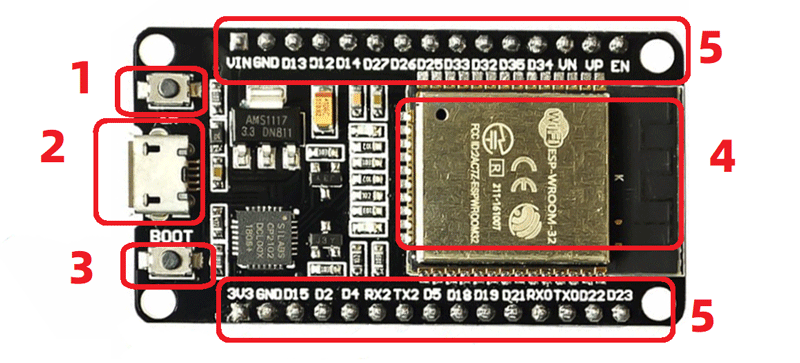
Board Module Descriptions
| Number | Function |
|---|---|
| 1 | Reset button |
| 2 | MicroUSB interface for programming, power input, etc. |
| 3 | BOOT button: Boot mode selection; press for download mode, release for run mode |
| 4 | ESP32-WROOM-32 module: General-purpose Wi-Fi + BT + BLE MCU module integrating traditional Bluetooth, low-power Bluetooth, and Wi-Fi. Supports extensive communication connections and direct internet access via router. |
| 5 | GPIO (General Purpose Input Output): Ports controllable via software for input and output. |
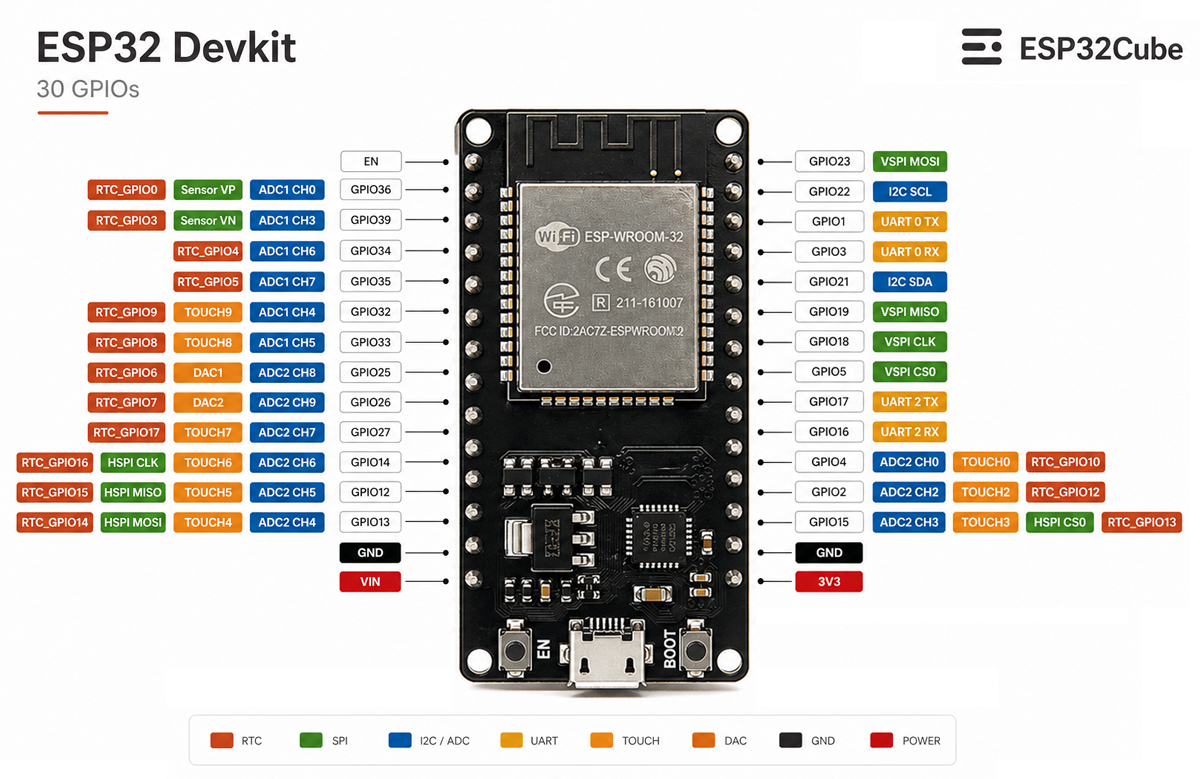
The ESP32 chip has 48 pins with multiple functions, but not all are exposed on every development board, and some pins are unusable.
ESP32 Pin Functions
The ESP32 chip features 34 programmable GPIO pins, each capable of multiple functions through pin multiplexing. Only one function is active per pin at a time. Pins can be configured as GPIO, ADC, UART, etc., in code. Some pins have specialized functions, making them suitable or unsuitable for specific projects.
ESP32 Development Methods
ESP32 supports several development approaches, with three primary ones:
- MicroPython: Uses Thonny IDE, supports Python syntax for easy learning.
- Arduino: Flexible open-source prototyping platform supporting ESP32 and ESP8266, developable with Arduino IDE or VSCode/Clion + PlatformIO.
- ESP-IDF: Official Espressif IoT development framework based on C/C++, providing a self-contained SDK for general applications.
Other niche options include Lua and JavaScript; explore them as needed.
Introduction to Arduino
Arduino is an open-source electronics prototyping platform developed by Italians Massimo Banzi and David Cuartielles. It consists of hardware (controller and components) and software (Arduino IDE based on simplified C++).
Advantages of Arduino
Arduino's simplicity and low entry barrier make it ideal for electronics, IoT, and prototyping. The official site offers examples from LED blinking to robot control. The active community shares projects and tips for quick onboarding.
Beginner Guide to Arduino
For newcomers:
- Understand features and benefits: Arduino is a quick prototyping platform with easy language and open-source projects for rapid idea realization.
- Learn hardware components: Includes a main board with controller (USB communication) and pins for connecting components like resistors, capacitors, LEDs.
- Master the programming language: Based on C++ with simplified syntax. Write code in Arduino IDE and upload to the board.
- Try simple projects: Blink LEDs, control servos, sense temperature. These build familiarity with language and hardware for complex projects.
In summary, Arduino is engaging for electronics prototyping. For beginners, it enables creative realization. This guide aims to spark interest in electronics.
Share this article
Comments
0Please sign in to post a comment.
No comments yet.