
ESP32 DFPlayer Mini (MP3-TF-16P): Wiring, Arduino Code, Playback and Troubleshooting
ESP32 DFPlayer Mini (MP3-TF-16P): Wiring, Arduino Code, Playback and Troubleshooting
The DFPlayer Mini, also commonly sold as the MP3-TF-16P, is a small and inexpensive MP3 audio module that can play audio files directly from a microSD/TF card.
When combined with an ESP32, it provides a simple way to add MP3 playback, voice prompts, alarms, notifications, and other audio functions without requiring the ESP32 to decode MP3 files itself.
In this tutorial, you will learn how to connect a DFPlayer Mini to an ESP32, configure UART communication, play MP3 files from a TF card, control playback and volume, monitor playback status, and troubleshoot common problems.
What You Will Learn
By the end of this tutorial, you will know how to:
- Connect a DFPlayer Mini to an ESP32.
- Configure UART communication between the ESP32 and DFPlayer Mini.
- Install and use the
DFRobotDFPlayerMiniArduino library. - Organize MP3 files on a TF card.
- Play a specific MP3 file.
- Control volume and playback.
- Pause, resume, and change tracks.
- Use the
BUSYpin to detect playback status. - Diagnose common DFPlayer Mini problems.
- Build a basic ESP32 MP3 player.
What Is the DFPlayer Mini?
The DFPlayer Mini is a compact MP3 playback module with an integrated audio decoder and amplifier.
A typical system looks like this:
The ESP32 sends commands to the DFPlayer Mini through a serial interface.
The DFPlayer Mini then handles:
- Reading the audio file from the TF card.
- Decoding the MP3 data.
- Generating the audio signal.
- Driving a small speaker through its onboard amplifier.
This means that the ESP32 does not need to perform the MP3 decoding itself.
This architecture is useful for applications such as:
- Voice prompts
- Alarm clocks
- Smart speakers
- Doorbells
- Robot projects
- Interactive displays
- Industrial equipment notifications
- IoT devices
- Educational projects
- Game and toy sound effects
ESP32 and DFPlayer Mini Wiring
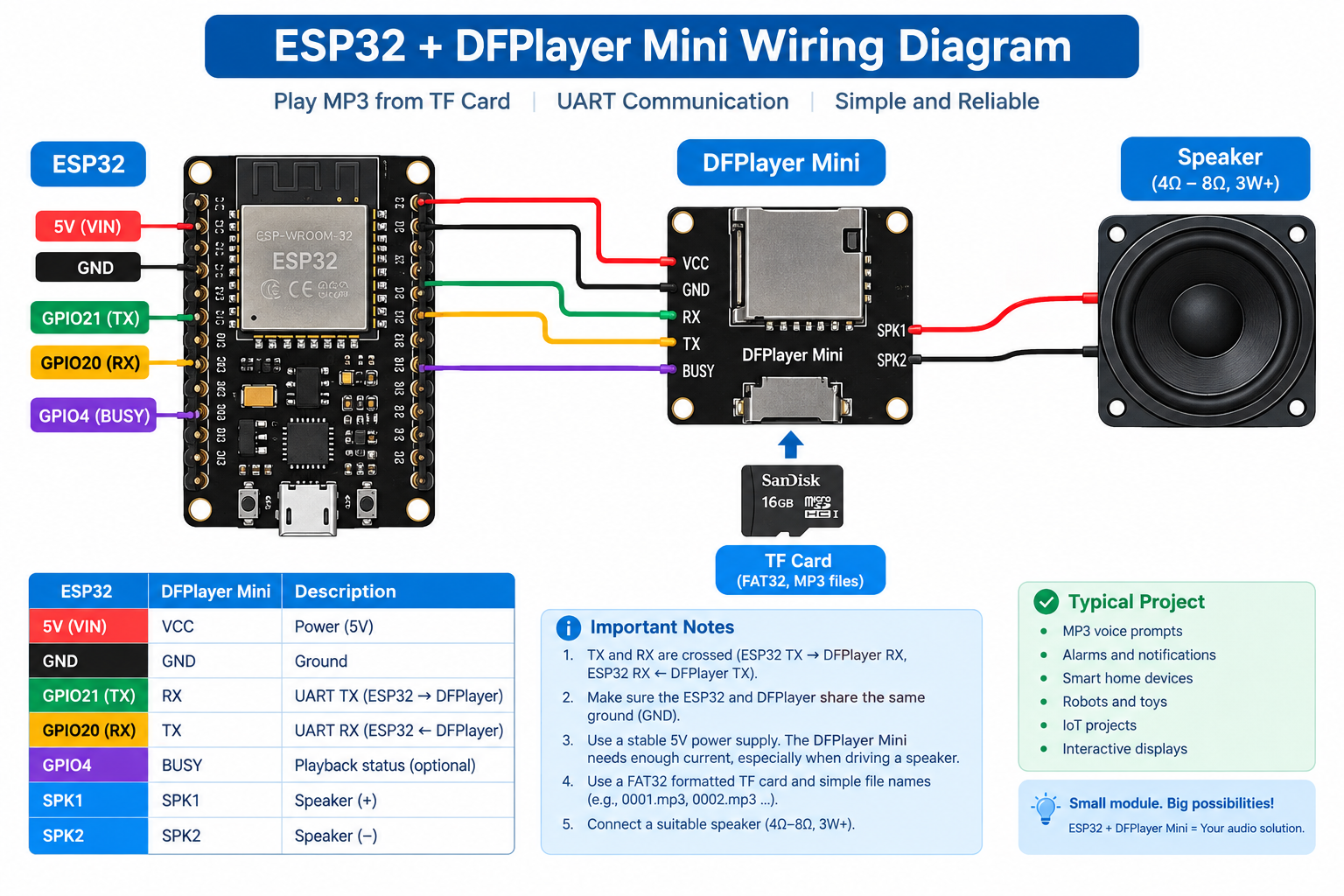
The DFPlayer Mini communicates with the ESP32 through UART.
The most important connection is:
ESP32 TX  →  DFPlayer RX
ESP32 RX  ←  DFPlayer TX
The UART pins shown below are only an example. ESP32 devices support configurable UART pins, so the exact GPIO numbers depend on the board and firmware configuration.
Basic Wiring
| DFPlayer Mini | ESP32 | Description |
|---|---|---|
| VCC | 5V | Power |
| GND | GND | Common ground |
| RX | ESP32 TX | UART data from ESP32 |
| TX | ESP32 RX | UART data to ESP32 |
| BUSY | GPIO | Playback status |
| SPK1 | Speaker | Speaker output |
| SPK2 | Speaker | Speaker output |
Important: TX and RX Are Crossed
UART connections are crossed:
ESP32 TX → DFPlayer RX
ESP32 RX ← DFPlayer TX
Do not connect TX to TX or RX to RX.
If the ESP32 cannot initialize the DFPlayer Mini, checking the TX/RX wiring should be one of the first troubleshooting steps.
Power Supply
The DFPlayer Mini is sensitive to power quality, especially when driving a speaker at higher volume.
A weak or noisy power supply can cause symptoms such as:
- Random resets
- Playback stopping
- Initialization failures
- Distorted audio
- The module working at low volume but failing at high volume
Use a stable power source and make sure the ESP32 and DFPlayer Mini share a common ground.
For projects with significant speaker volume or long operating periods, it is also useful to place appropriate supply-side decoupling near the DFPlayer Mini.
Understanding the DFPlayer Mini Pins
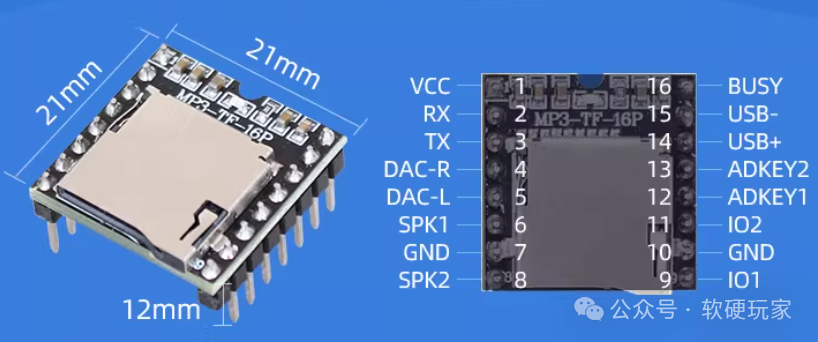
The exact pin arrangement can vary slightly between module versions, so always check the silkscreen on your particular board.
Common pins include:
| Pin | Function |
|---|---|
| VCC | Power input |
| GND | Ground |
| RX | UART receive |
| TX | UART transmit |
| BUSY | Playback status |
| SPK1 | Speaker output |
| SPK2 | Speaker output |
| DAC_L | Left audio output |
| DAC_R | Right audio output |
The SPK1 and SPK2 outputs are intended for direct connection to a suitable speaker.
The DAC_L and DAC_R outputs can be used when an external audio amplifier or other audio circuitry is required.
BUSY Pin: Detecting Audio Playback
The BUSY pin is useful when the ESP32 needs to know whether the DFPlayer Mini is currently playing audio.
In a common configuration:
BUSY = LOW   → playback active
BUSY = HIGH  → playback stopped
For example:
const int MP3_BUSY = 10;

void setup() {
  pinMode(MP3_BUSY, INPUT);
}

void loop() {
  bool isPlaying = (digitalRead(MP3_BUSY) == LOW);

  if (isPlaying) {
    Serial.println("Playing");
  } else {
    Serial.println("Stopped");
  }

  delay(200);
}
The exact GPIO number is only an example and should be changed according to your ESP32 board and wiring.
Preparing the TF Card
The TF card is one of the most common sources of DFPlayer Mini problems.
Before testing the ESP32 code, prepare the card carefully.
File System
FAT32 is a practical choice for typical DFPlayer Mini projects.
Use a compatible microSD/TF card and format it correctly before copying your audio files.
Avoid filling the card with unrelated files while troubleshooting.
MP3 File Names
A simple naming scheme is:
0001.mp3
0002.mp3
0003.mp3
0004.mp3
For example:
TF Card
│
├── 0001.mp3
├── 0002.mp3
├── 0003.mp3
└── 0004.mp3
This makes track selection predictable.
For example:
player.play(1);
can be used to play the first numbered track.
Keep the Initial Test Simple
When testing a new DFPlayer Mini, start with a small number of files:
0001.mp3
0002.mp3
0003.mp3
Do not start by testing a complex directory structure.
First verify that:
- The TF card is detected.
- The DFPlayer initializes.
- Track 1 can be played.
- The speaker works.
- Volume control works.
Once the basic configuration is working, add more complex file organization.
Installing the Arduino Library
This tutorial uses the commonly used:
DFRobotDFPlayerMini
Arduino library.
In Arduino IDE:
Sketch
    ↓
Include Library
    ↓
Manage Libraries
    ↓
Search for:
DFRobotDFPlayerMini
Install the library provided by DFRobot.
After installation, your sketch can include:
#include <DFRobotDFPlayerMini.h>
ESP32 UART Configuration
The ESP32 has hardware UART peripherals, so a hardware serial port should be used for communication with the DFPlayer Mini.
For example:
HardwareSerial MP3Serial(1);
Then configure the UART:
MP3Serial.begin(9600, SERIAL_8N1, RX_PIN, TX_PIN);
The exact GPIO numbers depend on the ESP32 board.
For example:
const int RX_PIN = 20;
const int TX_PIN = 21;
would mean:
ESP32 GPIO20 ← DFPlayer TX
ESP32 GPIO21 → DFPlayer RX
Always check the pin assignment for your specific ESP32 board.
Basic ESP32 DFPlayer Mini Example
The following example initializes the DFPlayer Mini and plays the first MP3 file.
#include <Arduino.h>
#include <DFRobotDFPlayerMini.h>

HardwareSerial MP3Serial(1);
DFRobotDFPlayerMini player;

const int RX_PIN = 20;
const int TX_PIN = 21;

void setup() {
  Serial.begin(115200);

  MP3Serial.begin(9600, SERIAL_8N1, RX_PIN, TX_PIN);

  Serial.println("Initializing DFPlayer Mini...");

  if (!player.begin(MP3Serial)) {
    Serial.println("Unable to initialize DFPlayer Mini.");
    Serial.println("Check wiring, power and TF card.");
    return;
  }

  Serial.println("DFPlayer Mini initialized.");

  player.volume(20);
  player.play(1);
}

void loop() {
}
The GPIO numbers above are an example for the wiring used in this tutorial. Change them if your ESP32 board uses different UART pins.
PlatformIO Configuration
If you are using PlatformIO, a basic configuration is:
[env:esp32]
platform = espressif32
board = esp32dev
framework = arduino

lib_deps =
    DFRobot/DFRobotDFPlayerMini
Make sure the framework is:
framework = arduino
and not another framework.
Playing a Specific MP3 File
Once the DFPlayer Mini is initialized, the simplest playback command is:
player.play(1);
For example:
player.play(1);
delay(5000);

player.play(2);
This plays track 1 and then starts track 2.
A practical application might map tracks to events:
if (temperature > 80) {
  player.play(1);
}
For example, track 1 could contain:
"Warning. High temperature detected."
This makes the DFPlayer Mini useful for embedded voice notification systems.
Controlling Volume
The DFPlayer Mini library provides a simple volume control interface.
For example:
player.volume(20);
The volume value is normally specified from a low level to a maximum level supported by the module/library.
A safer approach is to start at a moderate volume:
player.volume(15);
Then increase it gradually during testing.
Very high volume can increase the current demand from the power supply and may expose power-supply or speaker limitations.
Pause and Resume
To pause playback:
player.pause();
To resume:
player.start();
Example:
player.play(1);

delay(5000);

player.pause();

delay(2000);

player.start();
Play the Next or Previous Track
The library also provides commands for track navigation.
player.next();
and:
player.previous();
For example:
if (nextButtonPressed) {
  player.next();
}
This can be used to create a simple MP3 player interface with buttons.
Checking Playback Status
If the BUSY pin is connected to the ESP32, the firmware can determine whether audio is currently playing.
const int MP3_BUSY = 10;

void setup() {
  Serial.begin(115200);
  pinMode(MP3_BUSY, INPUT);
}

void loop() {
  if (digitalRead(MP3_BUSY) == LOW) {
    Serial.println("Audio is playing.");
  } else {
    Serial.println("Audio playback has stopped.");
  }

  delay(500);
}
This is useful for applications where the ESP32 needs to perform another action after an audio message finishes.
For example:
Sensor event
     ↓
Play warning
     ↓
BUSY = LOW
     ↓
Wait for playback
     ↓
BUSY = HIGH
     ↓
Continue application
Creating a Simple Button-Controlled MP3 Player
The DFPlayer Mini can be combined with push buttons to create a simple standalone audio controller.
For example:
const int BUTTON_NEXT = 4;
const int BUTTON_PREVIOUS = 5;
const int BUTTON_PLAY = 6;
The application can then map the buttons to:
player.next();
player.previous();
player.start();
player.pause();
A more complete application might look like:
             ESP32
               │
       ┌───────┼────────┐
       │       │        │
     Button  Button   Button
     Next    Previous   Play
       │       │        │
       └───────┼────────┘
               │
               ▼
          DFPlayer Mini
               │
               ▼
            Speaker
Common DFPlayer Mini Problems
Most DFPlayer Mini problems can be traced to one of four areas:
UART wiring
     │
     ├── TX/RX reversed
     │
Power
     │
     ├── unstable supply
     │
TF Card
     │
     ├── incompatible format
     ├── incorrect file organization
     │
Audio
     │
     ├── speaker wiring
     └── unsuitable speaker
The following sections cover the most common problems.
DFPlayer Mini Initialization Failed
If you see:
Unable to initialize DFPlayer Mini.
check the following items in order.
1. Check TX/RX
Make sure:
ESP32 TX → DFPlayer RX
ESP32 RX ← DFPlayer TX
2. Check GND
The ESP32 and DFPlayer Mini must share a common ground.
3. Check Power
Make sure the DFPlayer Mini is receiving a stable supply.
4. Check the TF Card
Insert a properly prepared TF card.
5. Check UART Configuration
Make sure the ESP32 UART is configured for the pins actually connected to the module.
No Sound
If the DFPlayer initializes correctly but no sound is produced, check:
Speaker wiring
For a directly connected speaker:
DFPlayer SPK1 ── Speaker ── SPK2
Do not assume that SPK1 and SPK2 are the same as a normal single-ended audio output.
Volume
Try:
player.volume(20);
MP3 file
Make sure the selected file exists and can be played by the module.
Power supply
A weak supply can cause playback problems, particularly when the amplifier is driving the speaker.
DFPlayer Plays the Wrong File
If the wrong audio file is played, check the TF card organization.
Start with a simple structure:
0001.mp3
0002.mp3
0003.mp3
Then test:
player.play(1);
If you need more complex folder-based playback, verify the file and folder numbering conventions supported by your module and library version.
TF Card Is Not Detected
If the DFPlayer cannot read the card:
- Reformat the card with a compatible file system.
- Remove unnecessary files.
- Copy a small number of MP3 files.
- Make sure the card is inserted correctly.
- Restart the DFPlayer after inserting the card.
For troubleshooting, always start with the simplest possible card configuration.
DFPlayer Resets When Volume Is Increased
This is often a power-related problem.
The speaker amplifier can require substantially more current during audio playback than when the module is idle.
Possible symptoms include:
Low volume → works normally

High volume → reset / distortion / playback stops
Check:
- Power supply capability
- Power wiring
- Ground connection
- Supply voltage stability
- Speaker impedance and suitability
- Local supply decoupling
Do not assume that a USB connection to the ESP32 automatically provides ideal power for every DFPlayer Mini and speaker configuration.
BUSY Pin Does Not Behave as Expected
If the BUSY signal appears incorrect:
- Check the exact DFPlayer Mini module version.
- Check the pin connection.
- Confirm that the ESP32 GPIO is configured correctly.
- Confirm the expected active level.
- Test the pin while playing a known working audio file.
A common configuration is:
LOW  → playing
HIGH → stopped
but the exact behavior should be verified on the hardware being used.
UART Communication Problems
If the ESP32 cannot communicate with the DFPlayer Mini:
Check:
1. TX/RX wiring
2. GND
3. UART number
4. GPIO assignment
5. Baud rate
6. Power supply
7. Module condition
A good troubleshooting technique is to reduce the system to:
ESP32
  │
  │ UART
  ▼
DFPlayer Mini
  │
  ▼
One MP3 file
  │
  ▼
One speaker
Get this configuration working before adding buttons, displays, sensors, Wi-Fi, or other peripherals.
Hardware Design Tips
Keep the Audio Wiring Short
Long audio and power wires can increase the chance of noise and interference.
Keep the DFPlayer Mini close to the speaker and power connections where practical.
Keep Digital and Audio Wiring Organized
The ESP32 can generate high-frequency digital activity from:
- Wi-Fi
- Bluetooth
- SPI
- I2C
- PWM
- Displays
- Sensors
Good wiring and grounding practices can help reduce audible noise.
Use a Suitable Speaker
Choose a speaker appropriate for the DFPlayer Mini's amplifier output.
Do not connect an arbitrary high-power speaker and expect the small onboard amplifier to drive it properly.
For larger speakers, use an external amplifier and the appropriate audio output from the DFPlayer Mini.
Complete Example: ESP32 MP3 Controller
The following example combines:
- UART communication
- DFPlayer initialization
- Volume control
- Track playback
- BUSY status monitoring
#include <Arduino.h>
#include <DFRobotDFPlayerMini.h>

HardwareSerial MP3Serial(1);
DFRobotDFPlayerMini player;

const int RX_PIN = 20;
const int TX_PIN = 21;
const int MP3_BUSY = 10;

void setup() {
  Serial.begin(115200);

  pinMode(MP3_BUSY, INPUT);

  MP3Serial.begin(
    9600,
    SERIAL_8N1,
    RX_PIN,
    TX_PIN
  );

  Serial.println("Starting DFPlayer Mini...");

  if (!player.begin(MP3Serial)) {
    Serial.println("DFPlayer initialization failed.");
    Serial.println("Check:");
    Serial.println("- TX/RX wiring");
    Serial.println("- Power");
    Serial.println("- GND");
    Serial.println("- TF card");
    return;
  }

  Serial.println("DFPlayer initialized.");

  player.volume(18);
  player.play(1);
}

void loop() {
  if (digitalRead(MP3_BUSY) == LOW) {
    Serial.println("Playing");
  } else {
    Serial.println("Stopped");
  }

  delay(1000);
}
This is intentionally simple.
Once the basic system works, additional functions such as buttons, displays, sensors, Wi-Fi, and automatic voice prompts can be added.
Example Application: ESP32 Voice Alarm
One practical application is a temperature alarm.
The basic logic can be:
Temperature sensor
       │
       ▼
     ESP32
       │
       │ temperature > limit
       ▼
 DFPlayer Mini
       │
       ▼
 "Warning: High temperature"
       │
       ▼
    Speaker
Example:
if (temperature > 80.0) {
  player.play(1);
}
Track 0001.mp3 could contain:
Warning. High temperature detected.
The same approach can be used for:
- Door open alerts
- Water level alarms
- Machine fault notifications
- Smart home voice prompts
- Robot voice feedback
- Industrial status messages
ESP32 DFPlayer Mini Troubleshooting Checklist
When a new project does not work, go through this checklist in order:
[ ] DFPlayer has stable power
[ ] ESP32 and DFPlayer share GND
[ ] ESP32 TX is connected to DFPlayer RX
[ ] ESP32 RX is connected to DFPlayer TX
[ ] UART pins match the firmware
[ ] UART baud rate is correct
[ ] TF card is inserted
[ ] TF card uses a compatible file system
[ ] MP3 file is correctly named
[ ] Speaker is connected correctly
[ ] Volume is not set too low
[ ] The basic example works before adding other hardware
Avoid changing several variables at the same time.
Testing one part at a time makes DFPlayer Mini problems much easier to isolate.
Frequently Asked Questions
Can I use a DFPlayer Mini with an ESP32?
Yes. The ESP32 can control the DFPlayer Mini through UART.
The ESP32 sends playback commands while the DFPlayer Mini handles audio decoding and playback.
Can ESP32 play MP3 files without a DFPlayer Mini?
Yes. The ESP32 has audio capabilities and can be used with other audio solutions.
However, a DFPlayer Mini is convenient when the application needs simple MP3 playback from a TF card without implementing the complete audio playback system on the ESP32.
Does DFPlayer Mini require an ESP32?
No.
The DFPlayer Mini can be controlled by many microcontrollers or other systems that can communicate with its serial interface.
The ESP32 is particularly convenient because it provides UART, Wi-Fi, Bluetooth, and substantial processing capability for larger projects.
How do I connect DFPlayer Mini to ESP32?
The basic UART connection is:
ESP32 TX → DFPlayer RX
ESP32 RX ← DFPlayer TX
GND      ↔ GND
The DFPlayer Mini also needs power and a suitable speaker connection.
What is the BUSY pin on DFPlayer Mini?
The BUSY pin provides playback status information.
A common configuration is:
LOW  → audio playing
HIGH → playback stopped
It can be connected to an ESP32 GPIO and monitored by software.
Why does my DFPlayer Mini have no sound?
Check:
- Speaker wiring.
- Volume setting.
- MP3 file.
- TF card.
- Power supply.
- DFPlayer initialization.
- UART communication.
Start with a single known-good MP3 file and a simple speaker connection.
Why does DFPlayer Mini keep restarting?
A common cause is an unstable or insufficient power supply, especially when the amplifier is driving a speaker at higher volume.
Check the power supply, wiring, grounding, and speaker configuration.
Why does DFPlayer Mini play the wrong track?
Check the file naming and numbering on the TF card.
Start with a simple structure:
0001.mp3
0002.mp3
0003.mp3
and test:
player.play(1);
Can DFPlayer Mini play WAV files?
The DFPlayer Mini is primarily used as an MP3 playback module, but supported audio formats can depend on the specific module and firmware version.
For reliable projects, verify the supported formats for the exact DFPlayer Mini hardware being used.
Related ESP32 Tutorials
You can also combine the DFPlayer Mini with:
- Push buttons
- OLED displays
- Temperature sensors
- PIR motion sensors
- Rotary encoders
- Wi-Fi
- Bluetooth
- ESP32-CAM
- Home automation systems
Conclusion
The DFPlayer Mini is a convenient way to add MP3 playback to an ESP32 project.
The basic architecture is simple:
ESP32
  │
  │ UART
  ▼
DFPlayer Mini
  │
  ├── TF Card
  │
  └── Speaker
The most important points to remember are:
- Cross the UART connections correctly.
- Connect the grounds together.
- Use a stable power supply.
- Prepare the TF card carefully.
- Start with simple numbered MP3 files.
- Test the basic playback example before adding other hardware.
- Use the
BUSYpin when the application needs playback status. - Keep the audio and power wiring clean.
Once the basic system is working, the DFPlayer Mini can be integrated into much more complex ESP32 applications such as voice alarms, smart devices, robots, IoT systems, and interactive projects.
References
- DFRobot DFPlayer Mini documentation
- DFRobotDFPlayerMini Arduino library documentation
- Espressif ESP32 Arduino documentation
- ESP32 HardwareSerial documentation
Share this article
Comments
0Please sign in to post a comment.
No comments yet.