
Obsidian remove strikethrough on completed tasks
This post shows how to remove strikethrough on completed tasks in Obsidian.
The default task style in obsidian like this, there is a strikethrough for the done task. That will effect the reading. If we want to remove the strikethrough, it can be done by provide a customer .css file.
1. [x] Do first step. There are some task need to do in first step. For example, testing with bad samples. ✅ 2024-12-20
2. [ ] Do next step
3. [ ] Do following step
Default style

We can remove the strikethrough style by add below css style.
create a .css file under folder .obsidian\snippets
.markdown-source-view.mod-cm6 .HyperMD-task-line[data-task="x"],
.markdown-source-view.mod-cm6 .HyperMD-task-line[data-task="X"] {
    text-decoration: none;
    color: inherit;
}
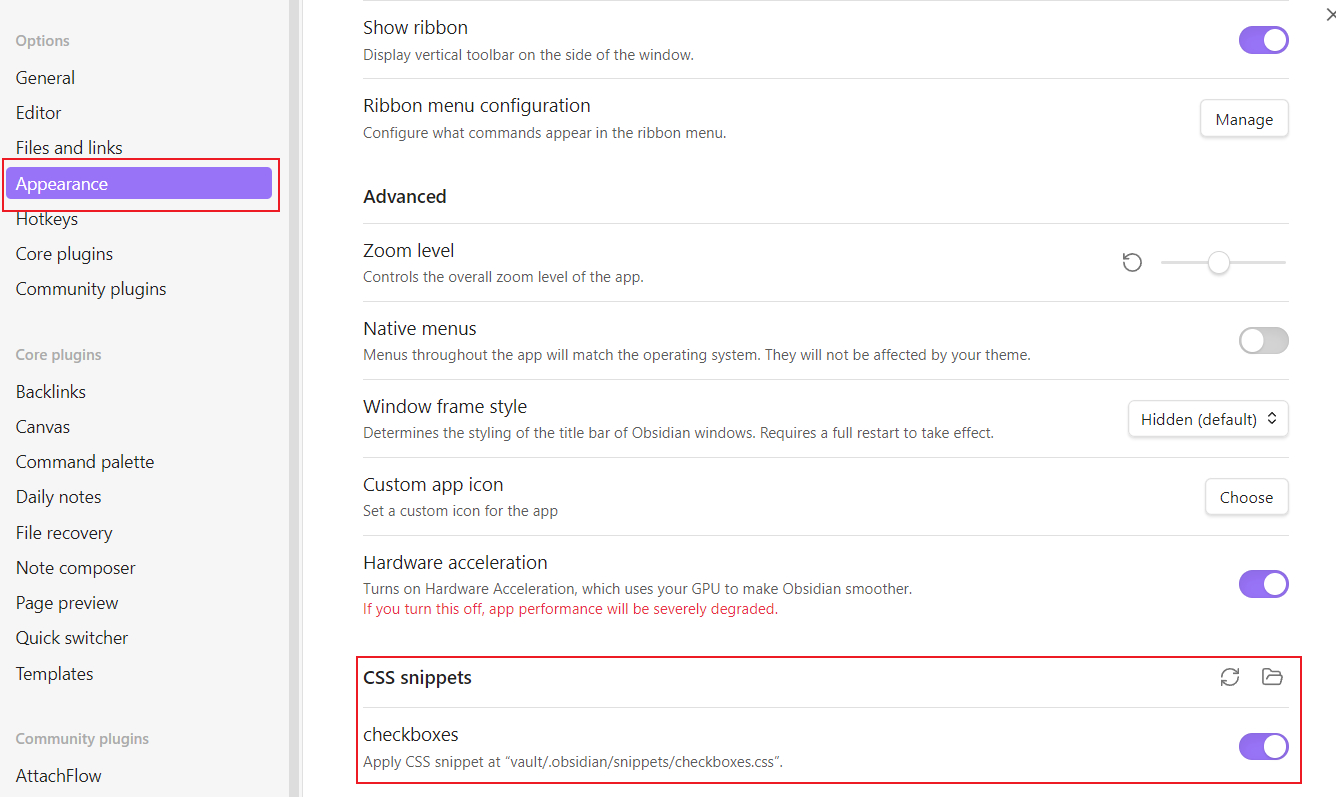
and in the setting --> Appearance --> CSS snippets, active the css file. Here is the ceckboxes.css
Then the to do list will looks like:

Share this article
Comments
0Please sign in to post a comment.
No comments yet.